
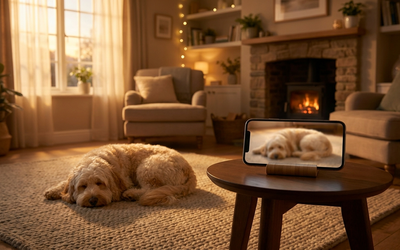
If you're typing "dog camera" into a search engine, you probably aren't really after hardware. You're after an answer to one question: what happens at home once you close the door behind you. The good news: the dog camera is already yours - it's the phone, tablet or laptop sitting in a drawer. All you have to do is install an app on it, place it in your dog's room and connect it to the device you take with you.
In this guide I'll walk you through, step by step, how to turn a phone into a dog camera at home, how that's different from a store-bought camera and when hardware really does have the edge. No sugarcoating: we're writing this as the makers of a dog monitoring app, but we'll keep the comparison honest.
How to turn your phone into a dog camera - 3 steps
The whole setup takes less time than making a cup of coffee:
- Install the app on two devices. One stays with your dog (an old phone, tablet, laptop - anything with a microphone and camera), the other you take with you. You sign in to the same account on both.
- Place the device in your dog's room. Ideally where your pup spends the most time: with a view of the bed, the couch or the front door. Plug it into a charger so the battery doesn't cut the session short.
- Start watching over your dog and head out. On your phone you get a live view, notifications about barking or howling, and once you're back - a report on how your dog's day really went.
That's it. No cables, no router setup, no 40-page manual. If you've ever made a video call, you'll handle this just fine.
A dog camera at home: what it really needs to do
Whether you go with a phone and an app or store-bought hardware, the list of what a pet parent actually needs is short:
- Live view with sound - video without audio is only half the picture. Whether your dog is whimpering tells you more than whether he's lying down.
- Notifications when something happens - you won't stare at a screen for 8 hours. The app should tell you on its own when your dog barks, howls or cries.
- A log of events, not the whole day - scrubbing through 8 hours of footage isn't realistic. You need the moments pulled out for you: barking at 10:42 for 4 minutes, howling at 13:15.
- Privacy - the camera sits in your home. Check whether recordings go to the maker's servers and where those servers are. Solutions that do sound recognition locally on the device have a natural edge here.
Notice what's not on that list: 4K resolution, treat launchers, a motorized swivel head. Those are features that look great in a hardware ad but rarely change anything about caring for a dog left home alone.
A phone with an app vs a store-bought camera
| Phone / tablet with an app | Store-bought camera | |
|---|---|---|
| Startup cost | $0 - you already have the device | An upfront hardware purchase, and sound analysis is often a separate subscription from the maker |
| Setup time | 5-10 minutes | 15-30 minutes + Wi-Fi setup |
| Understands dog sounds (barking, whimpering, howling) | Yes - if the app has sound recognition | Usually not (detects "noise", often for an extra fee) |
| Report after your time away | Yes (in Merdilo: timeline + Calm Score) | Rarely - usually raw recordings |
| Recording privacy | Depends on the app; on-device analysis possible | Usually the maker's cloud |
| Take it on vacation / to a second home | Yes - it's just a phone | Needs to be set up all over again |
When does hardware win? If you don't have any spare device and you want a permanent, wall-mounted live view around the clock - a camera can be a nice addition. Just remember it's a different need: the live view alone won't tell you whether the barking was a quick reaction to the elevator or mounting stress. To understand how your dog copes with being alone, what's already in the drawer is enough.
A dog baby monitor - the same thing, just simpler
Some pet parents know this idea from parenting: a baby monitor, a device that watches over the baby and lets you know when something happens. A dog baby monitor works exactly the same way - with one difference: instead of crying, it listens for barking, whimpering and howling.
A phone with Merdilo is exactly that kind of dog monitor: one device watches over your pup, the other you carry with you. And because sound recognition understands dog vocalizations, you don't get an alert when a garbage truck rolls by outside - only when your dog is genuinely letting you know that something's going on.
What a camera alone won't tell you
Video answers the question "what is my dog doing right now". It doesn't answer the more important one: how your dog copes with being alone in general. For that you need data from many sessions:
- Does he bark the moment you leave, or only after an hour?
- Are the vocalizations getting shorter week by week (the training is working) or longer (the challenge is growing)?
- How long does it take him to settle down after you leave?
Merdilo gathers this automatically: after every session you get a timeline of events and a Calm Score, and over the long run - a trend. If you're working with a dog behaviorist on separation anxiety, observations like these from a few days give them concrete material to work with, rather than a story from memory.
Frequently asked questions
Is an old phone good enough as a dog camera?
In most cases, yes. The device needs a working microphone, a camera and the ability to install an app. A phone that has been sitting in a drawer for two years usually checks all those boxes - just plug it into a charger for the session.
Does it work without Wi-Fi at home?
To watch from somewhere else, both devices need internet - usually Wi-Fi at home, and mobile data on your side is enough. If your home internet goes down, some apps can switch to a cellular connection, as long as the device with your dog has a SIM card.
How much battery does a session use?
Watching over your dog with the camera is fairly demanding, so it's best to keep the device with your dog plugged into a charger. On your own device the drain is small - you only turn on the live view when you want to take a peek.
What about privacy - does anyone see the footage from my home?
It depends on the app. In Merdilo, sound recognition happens locally on the device, and video and audio flow directly between your devices over an encrypted connection - we don't watch them and we don't store them on our servers.
Can I try Merdilo for free?
Yes - for the first 7 days you get full access free: set up watching over your dog, see the reports and the Calm Score. If you decide it's not for you, cancel the trial anytime and pay nothing.
Start today - first 7 days free
You already have everything you need: two devices and a dog you want to understand better. Download Merdilo on iPhone, Android, Mac or Windows, set up your first session in 5 minutes and see how your dog really copes when you head out.